Comparison · prices checked 21 Nov 2026
JPEGmini alternative for Mac: how JpegSlim compares
The short answer
JPEGmini is the proven pick: Mac and Windows, photos, HEIC and video, on sale now from US$59 (US$89 with Lightroom, Photoshop and Capture One plugins). JpegSlim is a newer Mac app for photos, planned at US$39 with Lightroom Classic and Capture One included, that checks every 512 px tile against an open quality floor. It is not on sale yet.
Join the waitlist See JpegSlim
- Choose JPEGmini if you need Windows, Photoshop, video or HEIC, or a tool you can buy today.
- Choose JpegSlim if you edit on a Mac in Lightroom Classic or Capture One, want a pass mark you can check yourself and a lower one time price.
- Free alternatives: ImageOptim (Mac), Squoosh (browser) and jpeg-recompress (command line), none with Lightroom or Capture One plugins.
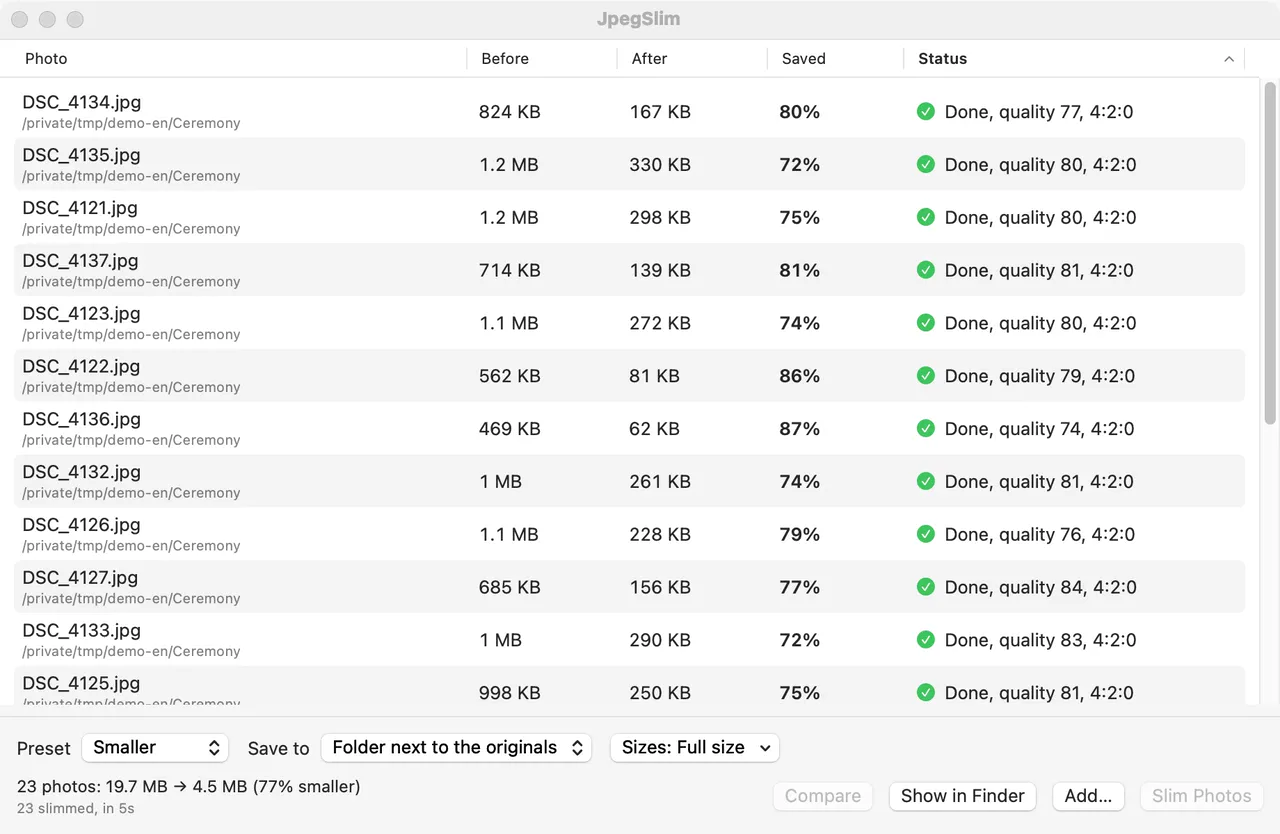
JPEGmini by Beamr has been the usual way to shrink photo exports since it launched in 2011 (opens in a new tab). JpegSlim by Nomado Apps is a newer Mac app that checks every part of every photo against an open quality score. Here is how the two compare on price, plugins, quality checks and file savings, with every JPEGmini fact linked to its source.
Key numbers
- US$39JpegSlim planned price, with Lightroom Classic and Capture One support includedPlanned launch price, one time
- US$89JPEGmini Pro + Plugins, its plan with Lightroom and Capture One pluginsjpegmini.com, checked 21 Nov 2026
- 65 to 75%JPEGmini savings measured in two independent reviews of real camera filesThe Phoblographer; DPReview via PetaPixel
- About 70%JpegSlim median saving on quality 100 exportsEarly synthetic tests, not real exports
JPEGmini vs JpegSlim at a glance
Both apps make full resolution JPEGs smaller without a visible change and keep the pixel dimensions. The real differences are platform, what is included in the price, and how each one decides what is safe to throw away.
| JPEGmini (Beamr) | JpegSlim (Nomado Apps) | |
|---|---|---|
| Status | On sale. Mac app version 4.5.1, released 4 August 2026 | Private beta. Not on sale yet; waitlist open |
| Platforms | Mac and Windows | Mac only: macOS 14 or later, Apple silicon and Intel |
| Price | From US$59; US$89 with plugins | US$39 planned, plugins included |
| Licence | One time purchase, one year of updates | One time purchase, no subscription |
| Lightroom Classic | Plugin, in Pro + Plugins | Export plugin (Post-Process Action), included |
| Capture One | Plugin, in Pro + Plugins | Process Recipe Open With, included |
| Photoshop | Plugin, in Pro + Plugins | Not available |
| Video | H.264 and H.265 (Pro) | Not available; photos only |
| HEIC | HEIC to JPEG | Not available |
| Quality check | Beamr Quality Measure, per tile; measure and pass mark not published | SSIMULACRA2, open; every 512 px tile must score 88 or more |
| Output sizes | Version 4.5 (June 2026) added export in several sizes to subfolders, per its Mac release notes (opens in a new tab). The release notes do not say which plan includes it | Full size, 2048, 1600, 1200 px or custom, all in one run |
| Automation | Watch folders, added in version 4.5; sold as Pro + Automations (US$99) and in the Complete Bundle (US$129) | Finder Quick Action, command line tool, MCP server for AI assistants |
JpegSlim is still in testing, so its details can change before launch. JPEGmini's plans and prices can change too; its own site has the final word.
Other JPEGmini alternatives
Last checked: 21 November 2026
If you only need smaller files now and then, a free tool may be enough. These are common free and low cost options, checked on 21 November 2026. None of them has a Lightroom or Capture One plugin listed on its site.
| Tool | Price | Platform | How quality is set |
|---|---|---|---|
| ImageOptim (opens in a new tab) | Free | Mac (macOS 11 or later); also a web service and command line | Lossless by default; lossy mode is optional in Preferences |
| Squoosh (opens in a new tab) | Free, open source (Apache 2.0) | Web browser; images are processed on your computer | You choose the codec and quality for each image |
| jpeg-recompress (opens in a new tab) | Free, open source (MIT) | Command line on Mac, Windows and Linux | Picks the lowest quality whose whole image score (SSIM by default) meets a target |
| XnConvert (opens in a new tab) | Free for private use; €15 per company licence | Windows, Mac and Linux | Batch converter; you set the JPEG quality yourself |
| Optimage (opens in a new tab) | US$15; free version limited to 24 images a day | Mac (macOS 10.13 or later) | Automatic; method not described on its site |
| Caesium Image Compressor (opens in a new tab) | Free; source code on GitHub | Windows and Mac | Compression settings you choose; up to 90% smaller claimed |
- ImageOptim suits web designers who want safe, lossless cleanup of a few images.
- Squoosh suits a one off hero image for a website, where you want to tune each file by eye.
- jpeg-recompress suits people comfortable with scripts who want free batch compression.
- XnConvert suits batch resizing and format changes on any desktop system.
- Optimage suits Mac users who want a cheap app and don't need editor plugins.
- Caesium suits Windows or Mac users who want a free desktop app for batches.
One caution about whole image scores. In our JpegSlim tests on the same 114 files, jpeg-recompress saved more on quality 98 and 100 exports because it aims lower, but on 2 files it left clearly visible damage such as banding in a sky. An average over the whole photo can hide one bad patch. That is the reason JpegSlim scores every tile; see how JpegSlim checks every tile.
Price and licence
Last checked on jpegmini.com: 21 November 2026
Both are one time purchases, not subscriptions. JPEGmini's paid plans each include one year of updates. JpegSlim's price is the planned launch price.
| Plan | Price | What you get |
|---|---|---|
| JPEGmini Free | US$0 | Full Pro features for 7 days, then 50 images a day; video only during the trial; 1 device |
| JPEGmini Pro | US$59 | Unlimited photos and video, JPEG and HEIC, resize and export, 3 devices, 1 year of updates |
| JPEGmini Pro + Plugins | US$89 | Pro plus plugins for Lightroom, Photoshop and Capture One |
| JPEGmini Pro + Automations | US$99 | Pro plus watch folders, background processing and batch presets |
| JPEGmini Complete Bundle | US$129 | Pro, all plugins, all automations and priority email support |
| JpegSlim (planned) | US$39 / ¥5,800 | Mac app, Lightroom Classic plugin, Capture One support, Finder actions, command line tool, MCP server |
- If you edit in Lightroom or Capture One, the fair comparison is JPEGmini Pro + Plugins at US$89 against JpegSlim at US$39.
Each JPEGmini plan includes one year of updates. When we checked, its pricing page did not say what happens after that year, so ask JPEGmini before you buy if that matters to you.
How each app decides how far to compress
Both apps make several more compressed versions of a photo and keep the smallest one that still looks the same. Both look at the photo in tiles rather than as one average. The difference is what the judgement is based on, and whether you can check it.
JPEGmini: Beamr Quality Measure
A closed measure modelled on how people see
- Makes several more compressed versions of the original JPEG.
- Scores each tile with the Beamr Quality Measure (BQM) and uses the score to control how hard that tile is compressed.
- Keeps the smallest version with no added visible artifacts compared with the original.
The measure and its pass mark are not published, so you judge the result by eye.
JpegSlim: a fixed floor on every tile
The open SSIMULACRA2 score, pass mark 88
One tile scores 86, under 88. JpegSlim raises the quality for the whole photo and checks again.
- Encodes the photo at many quality levels with the mozjpeg encoder.
- Decodes each result and scores every 512 px tile with SSIMULACRA2.
- Keeps the smallest file in which every tile scores 88 or more.
On the SSIMULACRA2 scale, 80 means no difference noticed side by side at 1:1, 85 means none noticed when the two are compared in place at 1:1, and 90 means none noticed even in a flicker test.
JPEGmini's approach is described on its help site (opens in a new tab). JpegSlim's scale comes from the published SSIMULACRA2 documentation (opens in a new tab).
Why a floor on every tile matters for wedding work: a clear sky, a skin gradient or a dark corner can start to band while the rest of the frame looks fine. A fixed pass mark on every 512 px tile means the weakest part of the photo decides, not the average.
How much smaller the files get
The biggest factor for both apps is how the JPEG was saved. Exports at quality 100 have the most room; camera JPEGs and files that are already compressed have little.
These two charts are not a head to head test. They use different files and different methods, so the gap between them does not show a winner. We have not yet run both apps on the same files. When we have run JPEGmini and JpegSlim on the same real Lightroom Classic and Capture One exports on a Mac, we will publish the results on this page.
What JpegSlim adds for gallery delivery
- A pass mark you can check. Every 512 px tile must score 88 or more on the open SSIMULACRA2 scale, and every result is decoded and scored again before it is kept. JPEGmini's measure and threshold are not published.
- A compare view. Drag a line between the original and the slimmed photo, or press Space to flip between them at 100% or 200%.
- Originals stay put. By default results go to a Slim folder next to the originals. If you choose Replace originals, they go to the Trash and Photos > Restore Originals of Last Run puts them back.
- Metadata kept. EXIF, IPTC, XMP and the colour profile stay, and a full size copy is never bigger than its original.
- Lightroom, Capture One and the Finder. A Lightroom Classic export plugin, Capture One Process Recipe support, Finder Quick Actions, a command line tool and an MCP server for AI assistants.
- Private. Everything runs offline on your Mac, in English or Japanese.
What it does not do: JpegSlim has no Windows version, no Photoshop plugin, and does not handle video or HEIC. If you need those, JPEGmini covers them.
Which one to choose
Choose JPEGmini if
You need it today, or beyond the Mac
- You work on Windows, or on both Mac and Windows
- You want a Photoshop plugin
- You also compress video or HEIC photos
- You want a tool on sale now, with a 7 day free trial
Choose JpegSlim if
You deliver galleries from a Mac
- You edit in Lightroom Classic or Capture One and don't want to pay extra for plugins
- You want to check each result against the original, dragging a split line or flipping between them at 100% or 200%
- You want a pass mark you can check: every 512 px tile at 88 or more
- You want the app in Japanese or English
Not sure yet
Test both on one real job
Export one job at quality 100. Run it through JPEGmini's free trial and, once it launches, JpegSlim's planned free trial. Check skies and skin at 100%, then compare the folder sizes.
How this comparison was made
I checked JPEGmini's plans and prices on its pricing page, its feature claims on its home page and how it works on its help site, all on 21 November 2026. Its downloads page listed Mac version 4.5.1, released on 4 August 2026.
JpegSlim facts come from the app itself, which is in private beta. Its size numbers come from our own synthetic test set described above. I have not yet run both apps on the same real exports, so this page does not claim that one compresses better than the other.
I make JpegSlim, so read this as a maker's comparison. Every JPEGmini fact links to its source below so you can check it yourself.
Sources
- New Startup JPEGmini Reduces Photos' Size, Not Their Quality, TechCrunch (opens in a new tab) techcrunch.com 6 Sept 2011: JPEGmini's launch.
- JPEGmini pricing (opens in a new tab) jpegmini.com Plans, prices, devices and updates. Checked 21 Nov 2026.
- JPEGmini home page (opens in a new tab) jpegmini.com Up to 80% claim; Mac and Windows; HEIC and video.
- How does JPEGmini optimization work? (opens in a new tab) help.jpegmini.com Beamr Quality Measure, tiles and candidate versions.
- JPEGmini for Mac downloads (opens in a new tab) jpegmini.com Version 4.5.1, 4 Aug 2026; version 4.5.0, 18 June 2026, added watch folders and export in several sizes to subfolders.
- JPEGmini review, The Phoblographer (opens in a new tab) thephoblographer.com 631 Nikon Z7 II files, 65% smaller.
- JPEGmini brings its file size shrinking tech to Capture One, PetaPixel (opens in a new tab) petapixel.com 31 July 2019, reporting DPReview's test on Canon EOS R files.
- SSIMULACRA2 (opens in a new tab) github.com What scores of 80, 85 and 90 mean.
- mozjpeg (opens in a new tab) github.com The JPEG encoder JpegSlim uses.
- ImageOptim for Mac (opens in a new tab) imageoptim.com Free; lossless by default.
- Squoosh on GitHub (opens in a new tab) github.com Apache 2.0; compresses locally in the browser.
- jpeg-archive (jpeg-recompress) (opens in a new tab) github.com MIT; quality chosen by SSIM and other metrics.
- XnConvert (opens in a new tab) xnview.com Free for private use; company licence prices.
- Optimage (opens in a new tab) optimage.app US$15; free version 24 images a day; Mac.
- Caesium Image Compressor (opens in a new tab) saerasoft.com Free; Windows 10 and macOS 12 or later.
- JpegSlim apps.nomado.company Presets, features, planned price and the jpeg-recompress test.
More on this from Nomado
- Why I make Mac apps for photographersJames Hirata on the delivery problems behind JpegSlim and the other apps.
- JPEGmini alternative for New Zealand wedding photographersLarge heli wedding galleries and delivery from remote locations.
- JPEGmini alternative for photographers shooting in JapanGallery sizes and delivery for weddings photographed in Japan.